You add a list of recent app users to an ad set, name the campaign “Retargeting,” and choose a message for people who already know the product. The setup looks familiar. But if that custom audience is being used as a suggestion, Meta can also deliver the ad to people outside it.
The audience name does not settle who is eligible to see the ad. The setting does. If the message says “Come back and finish setting up your account,” broader delivery can put that assumption in front of someone who has never registered.
For app promotion, confirm the ad set actually shows the required inclusion-control and exclusion options for the app’s operating system before relying on them. The checks below do not establish availability for every app campaign.
This guide uses Meta’s public help pages checked on November 9, 2026. Verify the current fields for the actual account, objective and advertising category before applying it.
One audience, three different jobs
Meta describes custom audiences as groups built from your own data sources or engagement on its platforms. Sources include customer lists, website visits and app activity. A customer list uses information such as email addresses or phone numbers to match people with Meta users. That defines how the audience is built. How you use it in the ad set is a separate decision. [1]
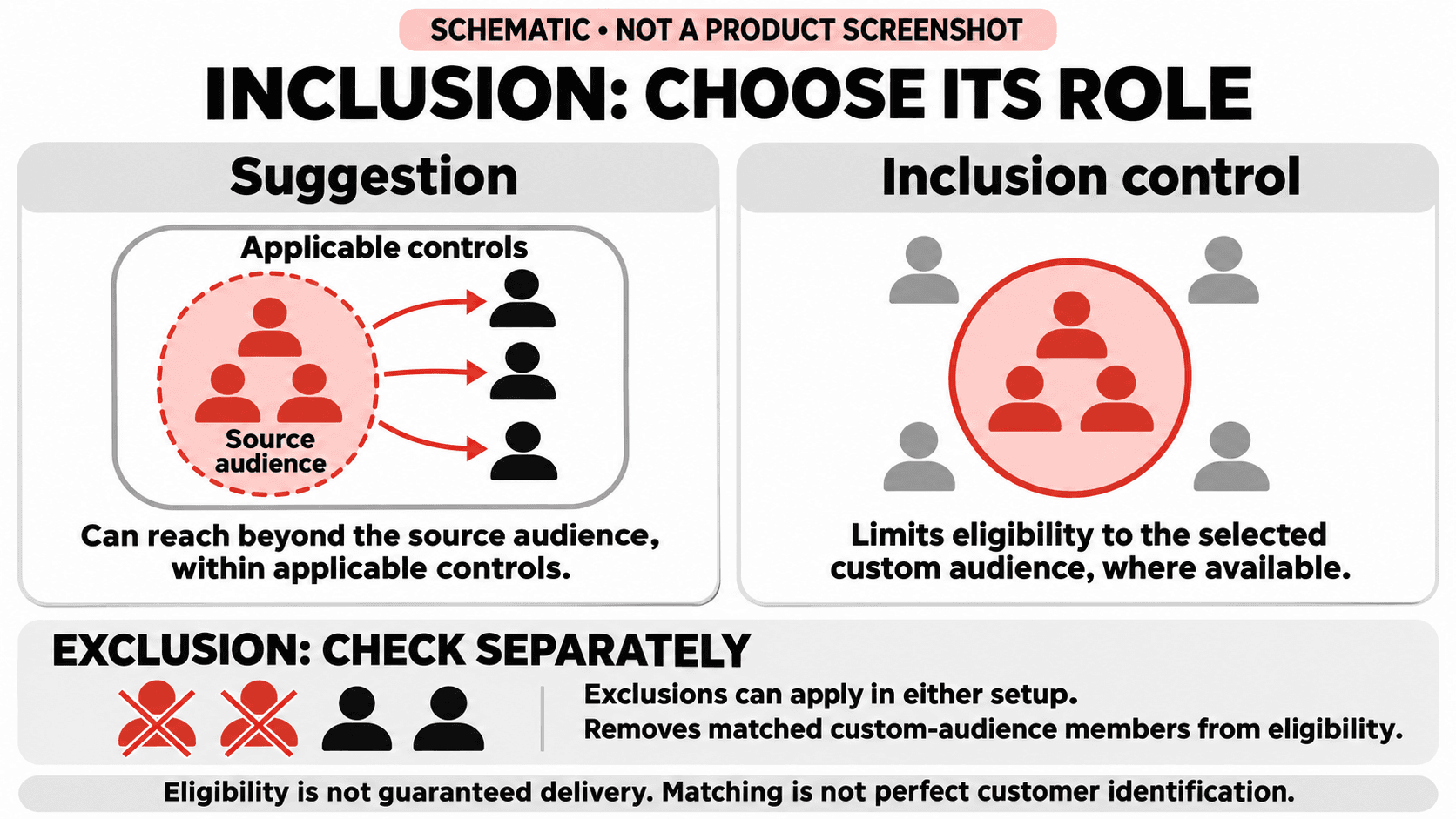
A suggestion guides delivery. In Advantage+ audience, an included custom audience can be an audience suggestion. Meta says it can show ads to people matching the suggestion and to other audiences when that is likely to improve performance, while staying within the applicable audience controls. A suggestion is not a promise to spend only on that list. [2]
An inclusion control limits eligibility. Meta’s current guidance describes “Further limit your audience” or “Further limit the reach of your ads,” with an option to use custom audience inclusions as controls. You may need to uncheck “Use as a suggestion.” This is the distinction to verify when the business requires delivery to be limited to a chosen custom audience. It does not guarantee that everyone in that audience will receive an ad. [2][3]
An exclusion removes an audience from eligibility. Meta lists custom audience exclusions under controls. Its Advantage+ campaign instructions explicitly say those exclusions remain controls even when “Use as a suggestion” is checked for inclusions. A suggestion steers delivery; an exclusion limits eligibility. Meta explicitly documents using an excluded custom audience as a suggestion in a prospecting campaign. The same list can therefore play both roles without allowing delivery to its excluded members. [3][4]
An exclusion also deserves a data-quality check. A customer-list audience is a matched audience; do not assume it includes every customer in your business. Verify the source, freshness and available match information before describing the campaign as reaching “only new customers.”
Start with the business requirement
Write one requirement before changing settings. If an app business wants to remind a defined group of existing users about a feature, membership in that group is a requirement for delivery. Adding it under “Suggest an audience” does not, by itself, establish that restriction.
For prospecting, the requirement might instead be to find potential customers beyond a useful source audience while excluding its matched existing customers. That is the two-role use of the same list described above: it guides the system without making its excluded members eligible. The creative must still make sense to someone unfamiliar with the app.
Neither approach is automatically better-performing. Choose the permitted reach first, then judge results against the campaign’s business objective.
Check the actual ad set, not the campaign name
Meta’s current instructions place these settings at the ad-set level. For sales, app promotion and leads, its Advantage+ campaign guide describes an Audience section showing “Advantage+ on.” The guide separates controls, suggestions and the option to further limit reach. [3]
Use the following review before launching or approving a duplicated campaign:
- Record the objective and required audience scope. Is broader delivery allowed, or is membership in the custom audience a requirement? If this is unclear, the setup cannot be approved just because the audience has been added.
- Open the Audience section and inspect controls. Confirm location, minimum age and any other limits required by the brief. Meta’s Advantage+ audience setup guide flags a location exception for “Reach more people likely to respond to your ads,” so read additional reach options rather than assuming the location field tells the whole story. [4]
- Find the custom audience inclusion. Note whether it sits under “Suggest an audience” or is explicitly configured as a control. Read the “Use as a suggestion” state where shown.
- If limited reach is required, inspect the limiting flow. Meta documents “Further limit your audience” or “Further limit the reach of your ads,” with the option to uncheck “Use as a suggestion” for custom audience inclusions. Verify the resulting field state. If that option is unavailable in this setup, stop short of claiming strict retargeting and resolve the account-specific limitation before launch. [2][3]
- Check exclusions separately. Open “Show more controls” where needed and confirm the exact excluded audience, its membership criteria and who keeps it current. If the same list is also an inclusion suggestion, the exclusion still removes its matched members from eligibility. [3][4]
- Record the approved setup. Complete the approval sentence below and append the audience IDs. Save it with the dated configuration record so another reviewer can understand what was approved.
- Recheck after duplication or edits. Meta says duplicating a campaign without Advantage+ audience and selecting “Recommended setup” applies Advantage+ audience automatically. “Original setup” follows a different path. Check the duplicate’s saved settings: is each custom audience inclusion still a control, or is it now a suggestion? Recheck exclusions too. [4]
Keep the creative promise aligned with the permitted reach
If broader delivery is allowed, write an ad that works for unfamiliar people. A prospecting message needs enough context to explain the product and the action being offered, rather than assume an existing account or purchase.
For limited retargeting, check that the selected audience actually represents the relationship the message assumes. “Visited the website,” “registered in the app” and “made a purchase” are different conditions. The audience source and membership window should support the brief, not merely have a convenient name.
Creative review should therefore include one plain question: could every eligible recipient reasonably understand why this message is being shown to them? If the answer depends on the recipient being in a particular group, make that requirement explicit in the audience setup review.
Report what the setup and results actually establish
A campaign using a custom audience suggestion should not be reported as a closed retargeting test merely because the audience was attached. A change from an inclusion control to a suggestion changes the permitted audience. If performance changes afterward, the comparison includes a different reach policy.
Record changes to audience scope alongside the optimization event, budget, creative and attribution settings. Do not compare before and after as if only the creative changed when the reach policy also changed.
Permitted reach and recorded conversions do not, by themselves, establish incremental growth; for that separate question, see our guide to testing added growth.
A practical approval line
Before approving the campaign, complete this sentence:
“This ad set uses [audience] as [a suggestion or an inclusion control], excludes [audience], and may reach [the permitted population]. The saved settings were checked on [date] by [owner].”
The same audience can fill the suggestion and exclusion slots, with the two different roles explained above. Append the audience IDs, then check the creative against the completed sentence. If the team cannot agree on what it means, the setup needs another review before spend begins.
Meta’s documentation also identifies category-specific restrictions, including restrictions on Advantage+ audience for certain Special Ad Categories. Advertisers in a Special Ad Category, such as financial products and services, should check the applicable category guidance rather than assume this general workflow is available. Platform options and labels can change, so revisit the documentation when the interface differs. [2]
The useful habit is simple: treat each audience as an input with a defined role. Know which settings guide delivery, which limit it, and which exclude people. That makes the campaign brief, Ads Manager setup and performance discussion describe the same campaign.
Sources
Primary sources checked November 9, 2026. The examples above are illustrative, not client cases or measured performance claims.
- Meta Business Help Center, About custom audiences.
- Meta Business Help Center, About Audience controls and Audience suggestions in Advantage+ audience.
- Meta Business Help Center, Choose audience settings in Advantage+ campaigns.
- Meta Business Help Center, How to create a campaign using Advantage+ audience.